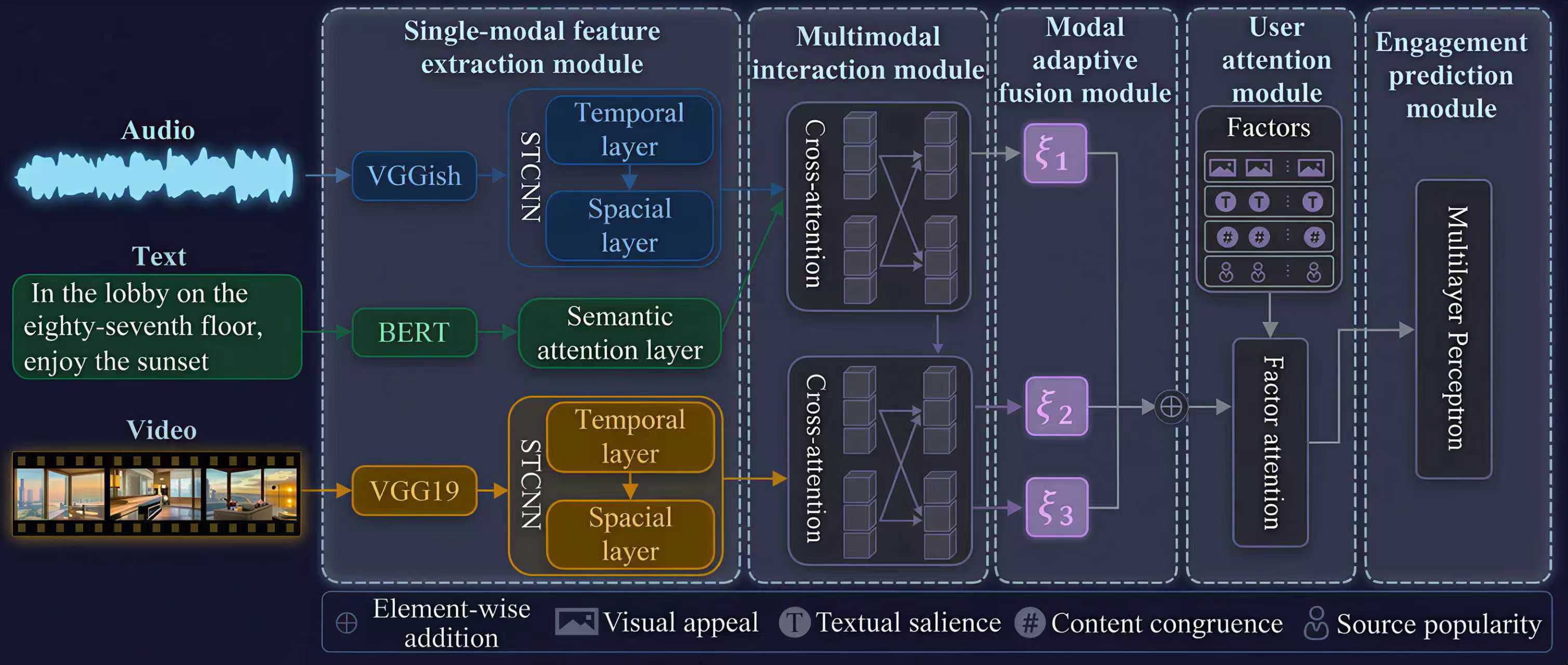
Platform overview

Upload video, cover, title and copy, then move through prediction, diagnostics and archive management in a single workflow.

Model architecture
System flow diagram

Workflow overview

System workflow and intelligence modules

The current system focuses on a complete web flow: upload, prediction, analysis and archive. The interface should explain capabilities in business language rather than only research terminology.

Each module maps to a visible user journey: what is uploaded, what the system infers, and how the result is displayed for decision making.

1
Step 1. Upload the target video, optional cover image, title and text content.
2
Step 2. The system extracts media metadata and text features from the uploaded materials.
3
Step 3. Voice, sentiment, arousal and consistency indicators are generated based on the selected inputs.
4
Step 4. Prediction and analysis pages display the structured results for this submission.
5
Step 5. The final record is stored in History for later comparison and review.
Frontend presentation focus
For the web page, the most important thing is to show upload input, analysis process and structured output in a way that matches the documentation.
Input · Video / Audio / TextOutput · Scores / Consistency / DataFrame-style results

Core analysis capabilities

Organized for demo and delivery: each block shows what the model reads, what it computes and what the page should display.

01

Human voice presence

Core dependencies

faster-whisper, pandas, tqdm, optional GPU PyTorch

Key path / variable

Replace the folder_path variable with the actual audio folder path

Input

MP3 audio files

Output

DataFrame containing segmented speech text

Note

If no GPU is available, adjust device and compute_type.

02

Text sentiment score & Text arousal score

Core dependencies

cntext, pandas, jieba, tqdm

Key path / variable

Replace the target note content with the text to be analyzed

Input

Chinese text content

Output

DataFrame containing sentiment / arousal totals and averages

03

Audio sentiment score & Audio arousal score

Core dependencies

music2emo, pydub, pandas, ffmpeg

Key path / variable

Replace audio_file_path with the actual audio file path

Input

MP3 and other audio paths

Output

Audio sentiment and arousal results

04

Title-video content consistency & Text-video sentiment consistency

Core dependencies

clip, opencv-python, torch, pillow, pandas

Key path / variable

Replace temp_path with the video file path and text_content with Title / Text

Input

Video file path plus matching text

Output

Similarity score between video and text

05

Text-audio / Text-video / Video-audio consistency

Core dependencies

opencv-python, pandas, nltk, scipy, NLTK corpora, DeepSentiBank

Key path / variable

Update the video folder, JSON file, sentibank.py path, frame path and temp path

Input

Video / audio / text sentiment data

Output

DataFrame containing multiple multimodal consistency indicators

Note

Documented execution order: extract frames -> generate JSON -> compute video sentiment mean -> calculate consistency.

USER RESOURCES / 使用資源

User manuals / 使用者手冊

View the complete operating guide, field definitions, report interpretation, and responsible-use notes.
查看完整操作流程、欄位定義、報告解讀及負責任使用說明。